![AtomLearningLogo_White-1.svg]](https://knowledge.atomlearning.io/hubfs/AtomLearningLogo_White-1.svg)
- Go to Activities in the left menu.
- Find your classwork under Live/Scheduled.
- Click View Progress to monitor how your pupils are doing in real time.
Available actions
- View Resources – Access helpsheets and videos to support pupils and consolidate learning.
- Show Transcript – View an individual pupil's correct and incorrect answers, plus time spent per question.
- Download Scores – Downloads a CSV including questions answered, student scores, and percentage correct.
- Download Pupil Logins – Download login details for pupils in the class.
- Stop Activity – Ends the classwork session at any point.
💡 When pupils begin, the Completed Activity field will show In Progress. Click Refresh at any time to see live updates, and again once complete to see final scores.
What pupils see
Pupils log in and click Join Session to start.

Once finished, they can view their Score Card in the Track page:
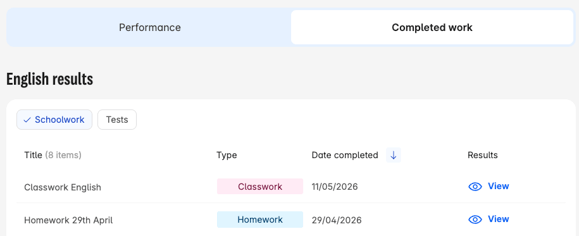
When they click View, they will be able to see:
- The total number of questions they answered correctly
- The number of questions they answered
- The percentage of questions they answered correctly
- The total time spent on the classwork
They'll also have a full clickable transcript of their answers - complete with explanations, videos, and helpsheets - making it easy to review corrections together in the classroom.