![AtomLearningLogo_White-1.svg]](https://knowledge.atomlearning.io/hubfs/AtomLearningLogo_White-1.svg)
To schedule homework activities for future dates:
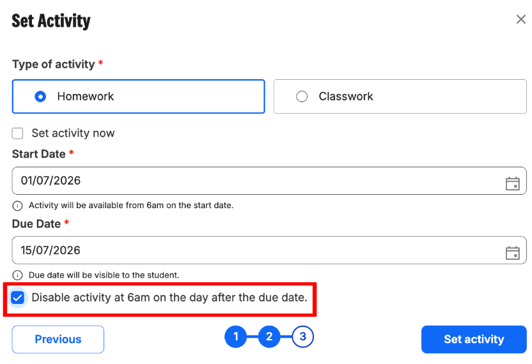
- Create a homework activity as normal
- Deselect 'set activity now'
- Create a start date
- Choose a due date
- Tick the box 'Disable activity at 6am the day after the due date'
The homework activity will go live on your selected start date.
Pupils can have a maximum of 5 homework activities active in the same subject at any one time. Any additional activities created after this limit is reached will not go live.
To prevent this, it is important that you select ‘Disable activity at 6am the day after the due date’ when setting up your homework. This will automatically free up a space once an activity has finished, allowing your next homework activity to go live and ensuring your homework continues to be released as planned.