
How do I change the subjects in my child's weekly plan?
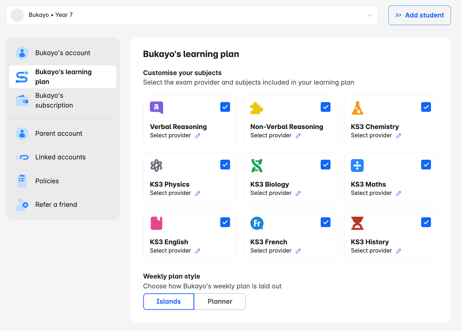
You can choose which subjects appear in your child's weekly plan from your Settings page:
- Log in using your email address and password, then click on 'Go to Settings'
- If you have more than one child, select the child whose plan you want to update, then click on their Learning plan
- Use the tick box to choose which subjects appear in your child's weekly plan.
- Select Save changes.
Changing subjects updates:
- The weekly island targets on your child's Learn page
- The subjects in your child's weekly plan
- The subjects you can set extra practices in
- The subjects you can track on the Track page
The subjects available depend on your plan. To access more subjects, upgrade your plan.