
What is the weekly plan?
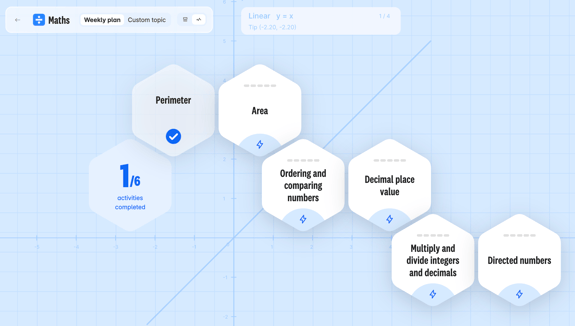
Your child's weekly plan is a personalised set of activities we set every week. It's designed to make sure they cover everything they need to know in Years 7, 8 and 9, at the right pace, and build strong foundations for their GCSEs.
To stay on track, all your child needs to do is:
- Log in to Atom and head to the Learn page.
- Complete the learning islands set for that week.
Children learn best in small, focused bursts, so we recommend splitting their Atom time into 3–4 short sessions each week.
How does the weekly plan decide what my child needs to learn?
Your child’s plan covers everything taught in Years 7, 8 and 9, and it changes as they learn. Every answer they give helps Atom understand what they know and what they need next:
- If they find a topic tricky, Atom makes the questions easier to suit their level. A few weeks later, the topic comes back as a recap island, so they can practise again until they feel confident.
- If they find a topic easy, Atom moves them on to harder questions to keep them stretched. The topic comes back later on as well, so their knowledge stays sharp.
That way, your child is always working at the right level: not too easy and not too hard.
What happens if my child misses a week?
Your child's plan will pick up where they left off, and they won't miss any topics. Their weekly island targets stay the same, and the plan adjusts so they still cover everything in good time.
How do I change the layout of my weekly plan?
Your child can view their weekly plan as a pathway or as a list. To switch between them:
- Select Learn.
- Choose a subject.
- In the top left-hand corner, select the pathway or list icon next to Custom topic.